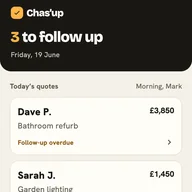
Automated quote chasers send for you. With Chas'up, you press send.
Automated quote-chasing tools send follow-ups to your customers on a schedule — by email, text or both. Chas'up takes a different approach: it does the remembering and suggests the words, but you read every message and send it yourself, from your own phone. Neither is right for everyone. Here's how to tell which suits you.
What automated quote follow-up tools do
There are two kinds. Some are small apps built only to chase quotes. Others are the follow-up features inside job-management software. Both send follow-up messages to customers who haven't replied, on a schedule you set up once. Depending on the product that's by email, by text, or both, and a few offer WhatsApp. For some businesses that's exactly right: set it up, and the follow-ups happen without you.
What to check before you automate
These tools differ a lot, so it's worth checking a few things on each one's own website before you sign up:
• Do you see each message before it goes? Some send on their own. Some wait for you to approve each one.
• Which channels does it use? Email, text, WhatsApp or a mix — and is that where your customers actually talk to you?
• Who does the message come from? Your own number and email address, or ones the tool provides?
• What happens when the customer rings you instead? A schedule can't know about a phone call, or a chat on the drive, unless you tell it.
• Where are your customers' details kept, and what does it cost each month?
How Chas'up is different
Chas'up doesn't send anything. It keeps the part that's genuinely hard — remembering who to follow up, and finding the words — and opens your own WhatsApp, Messages or email with a draft. You read it, change it if you like, and press send from your own phone. Then you tell Chas'up you sent it.
| Automated follow-up tools | Chas'up | |
|---|---|---|
| Who sends the message | The tool, on a schedule. Some ask you to approve each one first. | You. Chas'up opens your own WhatsApp, Messages or email with a draft. |
| Channels | Email, text or both. It varies by product and plan. | WhatsApp, text, call or email, from your own phone. |
| Wording | Templates or generated messages. Many let you edit them. | A suggested message in your style (Friendly / Standard / Direct) that you can edit every time. |
| When a customer replies | Some detect replies and stop. It varies. | It can't see replies. You record them yourself. |
| When a job's won or lost | Depends on the tool and how it's set up. | Reminders stop when you mark it Won or Lost. |
| Where customer details live | Usually in the provider's online account. | On your iPhone, with a backup in your own iCloud. |
| Effort | Low once it's set up. | A little each time. You do the sending. |
| Best for | Higher volumes, office teams, or anyone who wants it hands-off. | Sole traders and small firms who want to read every message before it goes. |
This compares two approaches, not any one product. Automated tools vary by product, plan and set-up, and their features change, so check each provider's own site. Last reviewed September 2026.
Looking for an alternative to automated quote chasers?
If you've tried an automated tool and it felt impersonal — or you simply don't want messages going to your customers before you've read them — Chas'up is the manual alternative. You still get the safety net, a reminder when each follow-up is due. But every message is yours: in your words, on the channel your customer already uses with you, sent when you decide.
The honest take
If you send a lot of quotes, have someone in the office, or simply want follow-ups to happen without you, an automated tool may suit you better — and we'd rather you used the right thing. Chas'up has real limits: it's iPhone only, it can't see when a customer replies, and it won't send anything for you. It's built for sole traders and small firms who want to read every message before it goes and send it from their own phone.
New to chasing quotes? Start with how to chase a quote without being pushy and our free message templates — or zoom out to all 7 ways trades keep track of quotes.
Chas'up vs automated chasers: common questions
Does Chas'up send quote follow-ups automatically?
No. Chas'up tells you which quotes to follow up and suggests the message, but you read it and send it yourself from your own WhatsApp, Messages or email. Nothing goes out on its own.
Is Chas'up a good alternative to automated quote chasers?
It depends what you want. If you'd rather follow-ups happened without you, an automated tool may suit you better. If you want to read every message before it goes and send it from your own phone, Chas'up is the manual alternative.
Can Chas'up chase quotes by WhatsApp and text, not just email?
Yes. Chas'up opens WhatsApp, Messages, a call or email with the message ready for you to edit and send. Some automated tools also offer text or WhatsApp, so check each one if the channel matters to you.
Will it message my customers without me knowing?
No. Chas'up can't send messages. You send every one yourself, and the reminders stop when you mark a job won or lost.